
 ampliflare
How IP and region blocking actually works on Cloudflare
How to block IP addresses and whole countries on Cloudflare. The Rulesets engine, firewall expressions, IP lists, and the token scopes you need.
Jun 21, 2026 · by Nadeem Siddique
Your site is getting hammered by a spread of IP addresses out of one country. You open the Cloudflare dashboard to block them, and an hour later you’re three docs pages deep in firewall expressions, “rulesets,” and account-level IP lists, still not sure you did it right.
Blocking traffic on Cloudflare sounds like it should be a single setting. It isn’t. There are several firewall systems to choose between, an expression syntax to learn, account-level IP lists, and a ruleset “phase” you attach the rule to. Blocking a whole country is a different shape again.
None of it is hard once you’ve done it once. The friction is that you usually learn it mid-incident, while something is hammering your site and you just want it to stop. Here’s how both cases work, including the parts the docs make you stitch together yourself.
There isn’t one firewall, there are layers
Cloudflare has shipped multiple generations of firewall: legacy IP Access Rules, legacy Firewall Rules, and the current Rulesets engine (also called WAF custom rules). New rules should go through the Rulesets engine, but tutorials and Stack Overflow answers mix all three, which is half the confusion.
The Rulesets engine works in phases, which are stages in request processing. Your custom blocking rules live in the phase called http_request_firewall_custom. Before you can add a rule, that phase needs an entrypoint ruleset on your zone, and if you’ve never added a custom rule it doesn’t exist yet. So step one is always: fetch the entrypoint, and create it if it’s missing.
GET /zones/{zone_id}/rulesets/phases/http_request_firewall_custom/entrypointOnce you have it, a rule is an expression plus an action. The action is block. The expression is where IP and country blocking diverge.
Blocking a country: an expression is enough
Cloudflare already knows the country of every request. It geolocates the connecting IP and exposes it as a field you can reference directly:
ip.src.country in {"US" "CN" "RU"}That’s the whole rule. ISO 3166 alpha-2 codes, uppercase, quoted, space-separated, inside braces. Attach it to the firewall phase with action: block and you’re done. You don’t need a list or any extra storage; the geolocation is built into the engine.
The only thing that trips people up is the syntax. It’s {"US" "CN"}, not ["US","CN"] or US,CN. Get a brace or a quote wrong and the rule silently matches nothing.
Blocking an IP: a list, not inline rules
You can block a single address with an inline expression like ip.src eq 203.0.113.10 (that’s a documentation example address; use a real one). But the moment you have more than a couple, inline expressions get unwieldy, and each zone has a finite rule budget you don’t want to spend one IP at a time.
The better pattern is an account-level IP List. Create one list, add every IP and CIDR you want to block, and write a single rule that references it by name:
ip.src in $blocked_ipsNow the rule never changes. Blocking another address is just adding an item to the list. And because the list lives at the account level, one blocklist can back rules across every zone you own. Update it once, and every zone honours it.
Lists vs expressions: the asymmetry worth remembering
This is the part the docs won’t put in one place. IP blocks and country blocks feel like the same feature, but they’re built on different primitives, and that changes how you edit them later:
- To change which countries are blocked, you rewrite the rule’s expression.
- To change which IPs are blocked, you edit the list and leave the rule alone.
If you ever build a UI or a script over this, that asymmetry is the thing to design around.
The token scopes you’ll need
This one bites people mid-task. The two cases need different API token permissions:
- Country blocks need Zone → Firewall Services → Edit.
- IP blocks also need Account → Account Filter Lists → Edit, because the list is account-scoped.
A token that can do one can’t necessarily do the other. If your country block works but your IP block returns a 403, this is almost always why.
If you automate it, keep the ids
Once a rule is live, it’s just a rule, with nothing tying it back to the script or dropdown that created it. If you want to toggle, edit, or delete it cleanly later, store its ruleset id, rule id, and (for IP blocks) its list id at creation time. That record is the difference between a rule you can manage and a one-way action you have to hunt down by hand.
The whole flow
Putting it together: both cases start from the same firewall entrypoint. The IP path branches off to create an account list first, then writes a rule that points at it; the country path goes straight to a rule with an ip.src.country expression. Both end up in the same Rulesets engine, and the rule ids get stored afterwards so the rules stay editable.
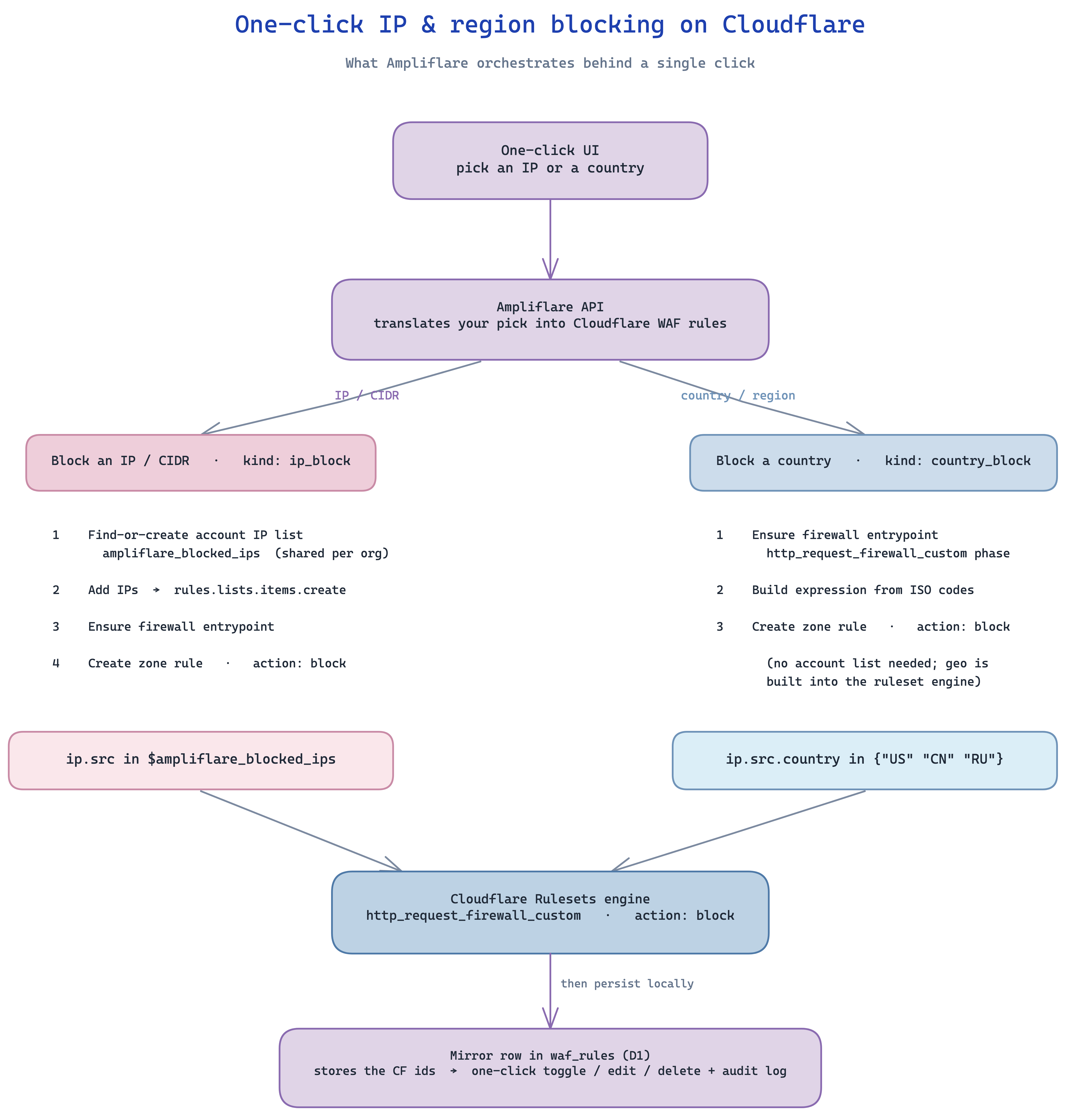
The shape is the same whatever you build it with: one firewall entrypoint, two paths off it, and a record of the ids so the rules stay manageable. The diagram shows one implementation; nothing about it is specific to Ampliflare.